
Archived Assurance Filings
After a review is completed, a read-only, archived version of the Assurance Filing will remain available in Canopy for institutional users.
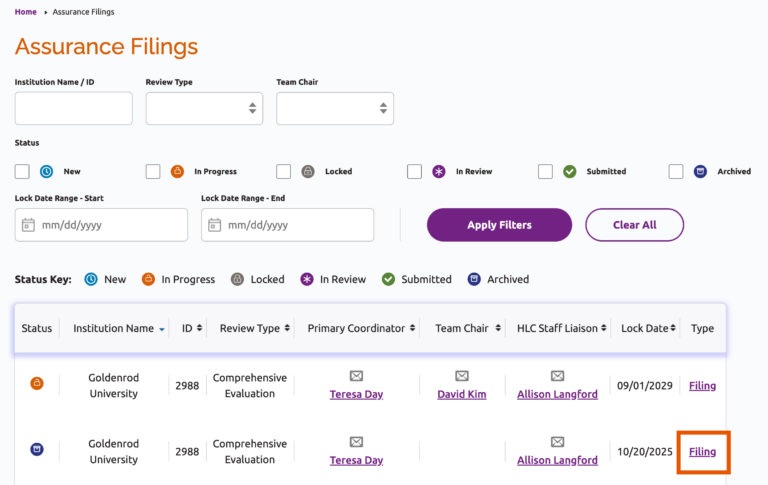
Archived filings are listed on the Assurance Filings landing page. To open an Assurance Filing, click the “Filing” link to the right of the lock date.
Users will be able to view and export the archived Assurance Filing, but will not be able to make edits to the Assurance Argument or Evidence File.
Access to Archived Filings
A user’s access to archived Assurance Filings depends on their institutional role in Canopy:
- Primary Filing Coordinators, Accreditation Liaison Officers and Chief Executive Officers can access all of their institution’s archived filings.
- Assistant coordinators, editors and readers can access archived filings that they are assigned to as active contributors.
Managing Contributor Access
Primary and assistant coordinators may edit or remove contributors from an archived filing. See Manage Contributors for instructions.
Note: No new contributors may be added to an Assurance Filing after it is locked for review.
Assurance Filing Instructions
User Guide Topics
All Users
Institutions
Peer Reviewers
Peer Corps Applicants

Related Resources

Questions?
Submit a Canopy Help Request